Factories > Overview
Warp Factories overview
# Warp Factories overview :::note Warp Factories is in **Early Access** and available to a limited set of teams. [Request access](https://www.warp.dev/factories/request-access) to use it with your team. If your team already has access, sign in to the <a href=https://platform.warp.dev>Warp Factories web app</a>. ::: A factory is a standing software development workflow that connects your repositories and engineering tools to a team of agents and execution infrastructure. It takes in requests, manages them from triage through review, and turns a growing backlog into mergeable pull requests. Your team stays in the loop to approve specifications and merge each pull request. <VideoEmbed url="https://www.youtube.com/watch?v=0WBk4ai8y1A" title="Introducing Warp Factories" /> ## What is a software factory? In practice, that means tracking each request as a work item, such as an issue, ticket, or triggered task, and moving it through specialized agents that triage it, write a specification when one is needed, implement the change, and review the result. Each factory applies a single policy across its work sources, so deploy separate factories for repository groups that need different policies. ### Sizing a factory Size factories by product surface, not by workflow. Group the repositories that ship together into one factory. For example: * One factory for your main application * One factory for your marketing site * One factory for your data pipelines Don't split those same repositories across multiple factories by team or task (frontend vs. platform, for example). Add [agents](/factories/factory-agents/) and [skills](/factories/factory-skills/) to specialize instead. <figure style={{ maxWidth: "563px" }}>  <figcaption>The general software factory loop. Warp Factories' default agents cover triage through review; add custom agents for the rest.</figcaption> </figure> ## Who benefits from Warp Factories Warp Factories is designed for engineering teams with repeatable work that extends beyond one coding session. Here's where it helps most: * Process a backlog of issues with a consistent triage and delivery policy. * Fix defects reported through support channels. * Review incoming pull requests or maintain services across repositories. ## What you get with Warp Factories * **Coordinated specialist agents** - A team of [factory agents](/factories/factory-agents/) handles each work item. A coordinating foreman routes it through the triage, spec, implement, and review agents, skipping stages that don't apply. You can add custom agents and automations to handle work the defaults don't cover. * **Definitions as code** - [Version-controlled definition files](/factories/factory-as-code/) describe your repositories, agents, automations, runners, [skills](/factories/factory-skills/), and MCP servers, so factory changes get the same review, history, and rollback as code changes. * **Integrations and the Factory MCP** - Work flows in from [Slack](/factories/integrations/slack/), [GitHub](/factories/integrations/github/), [GitLab](/factories/integrations/gitlab/), [Linear](/factories/integrations/linear/), and [Jira](/factories/integrations/jira/), plus [custom webhooks](/factories/webhooks/), direct runs, and schedules. The [Factory MCP](/factories/factory-mcp/) connects coding agents and other MCP clients. * **Model and harness choice** - Each agent can use a different model and [supported harness](/platform/harnesses/), including the Warp Agent, Claude Code, and Codex. * **Measurement and self-improvement** - The [factory dashboard](/factories/factory-dashboard/) shows work-item status, runs, automations, costs, and benchmarks. [Scorers](/factories/measure-and-improve/scorers/) classify completed runs, [Benchmarks](/factories/benchmarks/) compare fixed tasks across configurations, and [Self-improvement](/factories/measure-and-improve/self-improvement/) turns repeated failures into follow-up work the factory proposes for review. * **Infrastructure control** - Choose Warp-hosted or managed self-hosted execution on an eligible Enterprise plan. The [infrastructure and security](/factories/infrastructure-and-security/) page compares execution models and links to the self-hosting setup path, as well as available inference and credential controls. ## How Warp Factories fits into Warp Warp Factories builds on the same agent infrastructure used across Warp. Every factory agent produces a standard [cloud agent run](/platform/), so the same APIs, runners, models, security controls, and observability apply. | Product | Role | | --- | --- | | **Warp** | The interactive development experience for local work with agents and code review. | | **Warp Agent** | The built-in agent harness that can power an individual factory agent. | | **Warp Factories** | Standing multi-agent workflows for software development. | ## Key terms Setup gives a factory and its foreman the same name by default, so it's easy to mistake one for the other. Here's how the terms differ: * **factory** - A standing software development workflow that connects repositories, tools, agents, execution infrastructure, and a measurable workflow. Distinct from Warp Factories, the product, and from the foreman, its coordinating agent. * **foreman** - The coordinating agent inside a factory, and the only one you talk to. It dispatches the other [factory agents](/factories/factory-agents/) and reports back. Every factory has exactly one. * **Foreman name** - The handle your team @-mentions in Slack and Linear to reach the foreman. Setup copies it from the factory's name, so the two usually match even though they're different things. See [Foreman name](/factories/factory-agents/#foreman-name). ```mermaid flowchart LR subgraph Factory["One factory"] Foreman["Foreman"] --> Agents["Triage, spec, implement,<br/>and review agents"] end Slack["Slack or Linear"] -->|"@handle"| Foreman ``` ## Related pages * [**Set up a factory**](/factories/quickstart/) - Create a factory and send its first work item. * [**Understand the execution model**](/factories/how-factories-work/) - See how the foreman coordinates stages, runs, and human decisions. * [**Meet the factory agents**](/factories/factory-agents/) - See what each agent does and how to configure its model, harness, and instructions. * **Adapt the system** - [Define the factory as code](/factories/factory-as-code/) and [connect its work sources](/factories/connect-your-factory/), or start from a working definition in [warp-factory-examples](https://github.com/warpdotdev/warp-factory-examples).Tell me about this feature: https://docs.warp.dev/factories/Warp Factories is open infrastructure for building internal software factories as code, from triage to implementation, review, and monitoring.
A factory is a standing software development workflow that connects your repositories and engineering tools to a team of agents and execution infrastructure. It takes in requests, manages them from triage through review, and turns a growing backlog into mergeable pull requests. Your team stays in the loop to approve specifications and merge each pull request.
What is a software factory?
Section titled “What is a software factory?”In practice, that means tracking each request as a work item, such as an issue, ticket, or triggered task, and moving it through specialized agents that triage it, write a specification when one is needed, implement the change, and review the result.
Each factory applies a single policy across its work sources, so deploy separate factories for repository groups that need different policies.
Sizing a factory
Section titled “Sizing a factory”Size factories by product surface, not by workflow. Group the repositories that ship together into one factory. For example:
- One factory for your main application
- One factory for your marketing site
- One factory for your data pipelines
Don’t split those same repositories across multiple factories by team or task (frontend vs. platform, for example). Add agents and skills to specialize instead.
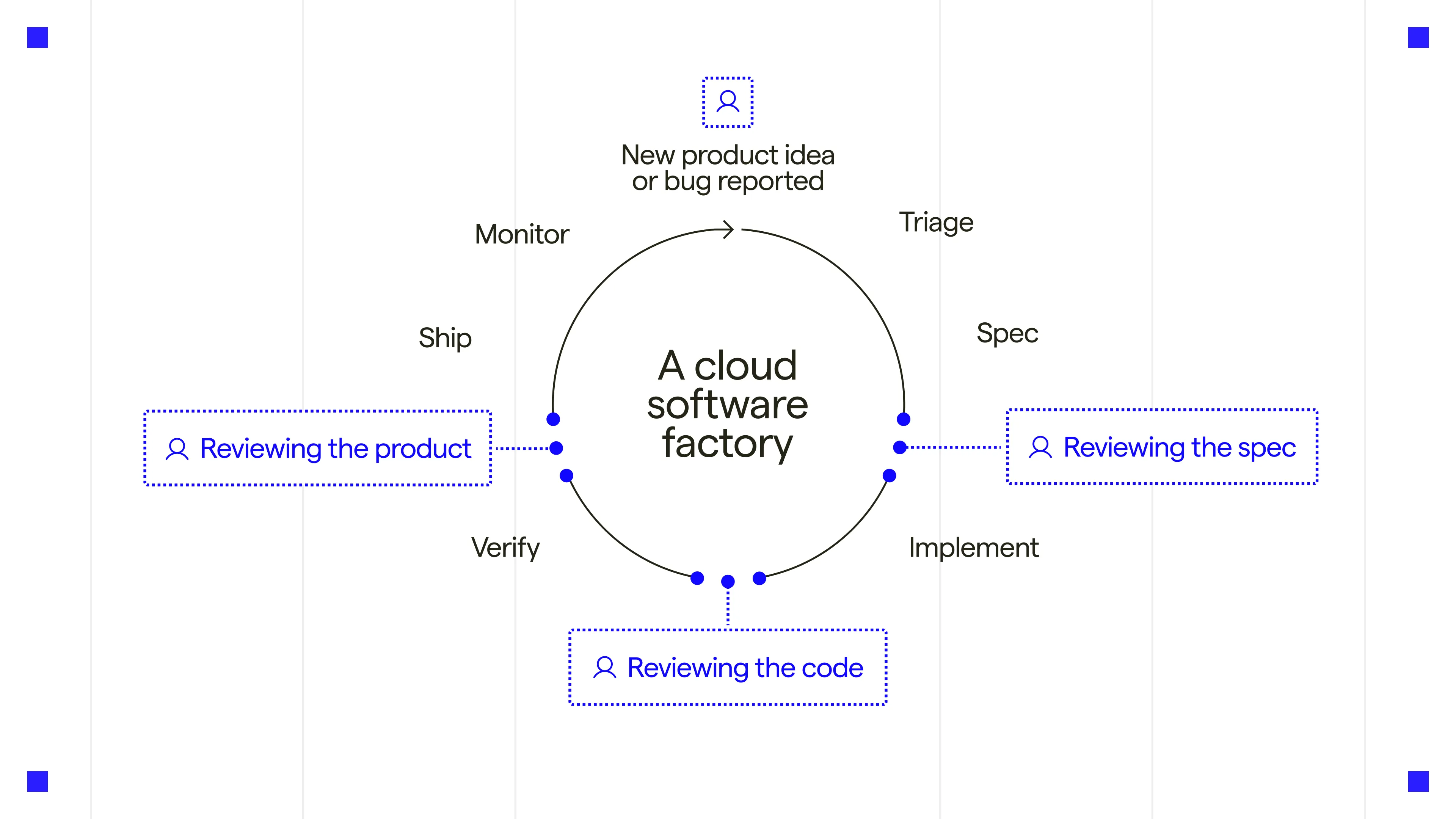
Who benefits from Warp Factories
Section titled “Who benefits from Warp Factories”Warp Factories is designed for engineering teams with repeatable work that extends beyond one coding session. Here’s where it helps most:
- Process a backlog of issues with a consistent triage and delivery policy.
- Fix defects reported through support channels.
- Review incoming pull requests or maintain services across repositories.
What you get with Warp Factories
Section titled “What you get with Warp Factories”- Coordinated specialist agents - A team of factory agents handles each work item. A coordinating foreman routes it through the triage, spec, implement, and review agents, skipping stages that don’t apply. You can add custom agents and automations to handle work the defaults don’t cover.
- Definitions as code - Version-controlled definition files describe your repositories, agents, automations, runners, skills, and MCP servers, so factory changes get the same review, history, and rollback as code changes.
- Integrations and the Factory MCP - Work flows in from Slack, GitHub, GitLab, Linear, and Jira, plus custom webhooks, direct runs, and schedules. The Factory MCP connects coding agents and other MCP clients.
- Model and harness choice - Each agent can use a different model and supported harness, including the Warp Agent, Claude Code, and Codex.
- Measurement and self-improvement - The factory dashboard shows work-item status, runs, automations, costs, and benchmarks. Scorers classify completed runs, Benchmarks compare fixed tasks across configurations, and Self-improvement turns repeated failures into follow-up work the factory proposes for review.
- Infrastructure control - Choose Warp-hosted or managed self-hosted execution on an eligible Enterprise plan. The infrastructure and security page compares execution models and links to the self-hosting setup path, as well as available inference and credential controls.
How Warp Factories fits into Warp
Section titled “How Warp Factories fits into Warp”Warp Factories builds on the same agent infrastructure used across Warp. Every factory agent produces a standard cloud agent run, so the same APIs, runners, models, security controls, and observability apply.
| Product | Role |
|---|---|
| Warp | The interactive development experience for local work with agents and code review. |
| Warp Agent | The built-in agent harness that can power an individual factory agent. |
| Warp Factories | Standing multi-agent workflows for software development. |
Key terms
Section titled “Key terms”Setup gives a factory and its foreman the same name by default, so it’s easy to mistake one for the other. Here’s how the terms differ:
- factory - A standing software development workflow that connects repositories, tools, agents, execution infrastructure, and a measurable workflow. Distinct from Warp Factories, the product, and from the foreman, its coordinating agent.
- foreman - The coordinating agent inside a factory, and the only one you talk to. It dispatches the other factory agents and reports back. Every factory has exactly one.
- Foreman name - The handle your team @-mentions in Slack and Linear to reach the foreman. Setup copies it from the factory’s name, so the two usually match even though they’re different things. See Foreman name.
flowchart LR
  subgraph Factory["One factory"]
    Foreman["Foreman"] --> Agents["Triage, spec, implement,<br/>and review agents"]
  end
  Slack["Slack or Linear"] -->|"@handle"| Foreman
Related pages
Section titled “Related pages”- Set up a factory - Create a factory and send its first work item.
- Understand the execution model - See how the foreman coordinates stages, runs, and human decisions.
- Meet the factory agents - See what each agent does and how to configure its model, harness, and instructions.
- Adapt the system - Define the factory as code and connect its work sources, or start from a working definition in warp-factory-examples.